

The timer controls how long the heat press applies pressure, while the temperature control sets the heat. A heat press timer controller in Kenya lets operators set and monitor these two parts of a press cycle. The right settings depend on the material and transfer, so treat time and temperature as separate controls when aiming for consistent production.
It’s easy to focus on the displayed values and miss what each control changes. The timer doesn’t set the heat, and the temperature setting doesn’t determine how long the press stays closed. Knowing the difference makes setup clearer and helps operators adjust the cycle to suit each job.
This guide explains the main controller settings, what the controls do during a press cycle, and how to adjust them in a Kenyan workshop. It also covers common causes of uneven results and the role of a digital temperature and timer controller in a heat-press setup.
Key Takeaways
- Separate the timer’s role from temperature control so you can set each part of the press cycle correctly.
- Learn how to read controller labels and adjust settings in a controlled way for the transfer and material in use.
- Use press results to identify whether timing, heat, pressure, or setup needs attention before changing multiple settings at once.
- Understand how a digital temperature and timer controller fits into a heat-press workflow, alongside equipment such as a flatbed press.
Heat press timer controller Kenya
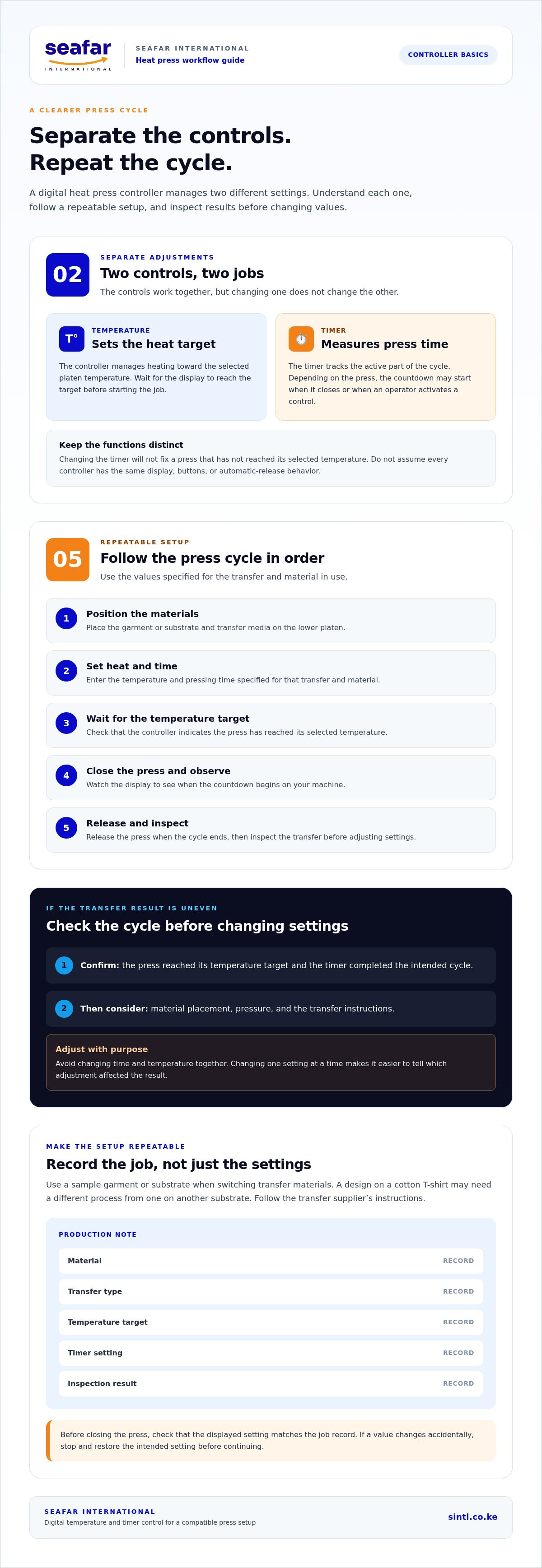
A heat press timer controller combines two separate adjustments: temperature and pressing time. On a digital controller, the temperature setting defines the heat target, while the timer measures the active part of the press cycle. The controls work together, but they do different jobs. Changing the timer, for example, won’t fix a press that hasn’t reached its selected temperature.
Start by identifying the display and its buttons. Depending on the design, a controller may show the current temperature, the selected temperature, or both. Buttons may adjust values or switch between settings. Read the labels and observe what changes when you press a button. Don’t assume every controller has the same button sequence or display layout.
The temperature function sets the target for the heated platen. The controller manages heating toward that target, while the display shows the machine’s progress. Wait for the display to reach the selected value before starting a job. Pressing while the platen is still heating can produce a different result from starting at the intended temperature.
The timer function sets how long the press cycle runs. Depending on the machine, timing may begin when the press closes or when the operator activates a control. Watch the display during a test cycle to see when the countdown starts. Don’t assume the timer opens the press automatically. Some presses require the operator to release the handle when the cycle ends.
Follow a repeatable setup sequence for each new transfer job:
- Position the garment or substrate and transfer media on the lower platen.
- Set the temperature and pressing time using the values specified for that transfer and material.
- Wait for the controller to indicate that the press has reached its temperature target.
- Close the press and observe when the timer begins counting down.
- Release the press when the cycle ends, then inspect the transfer before adjusting settings.
This sequence separates setup from diagnosis. If a transfer doesn’t adhere as expected, check whether the press reached its target and the timer completed the intended cycle. Then consider material placement, pressure, and the transfer instructions. Changing time and temperature together makes it harder to tell which adjustment affected the result.
Use a sample garment or substrate when switching to a different transfer material. A design applied to a cotton T-shirt, for example, may need a different process from one applied to another substrate. Follow the transfer supplier’s instructions for the material in use. Record the working settings beside the job name so operators can reproduce the setup later.
Keep the controller readable during production. Before closing the press, check that the displayed setting matches the job record. If a value changes accidentally, stop and restore the intended setting before continuing. A production note can list the material, transfer type, temperature target, timer setting, and inspection result. These details help identify recurring problems without relying on memory.
When comparing a heat press timer controller in Kenya, consider how clearly the settings are displayed and how the controls fit your press workflow. SEAFAR INTERNATIONAL supplies the Yinghe Digital Heat Press Temperature & Timer Controller, a digital temperature and timer control option. Used with a compatible press setup, it lets the operator manage the heat target and cycle timing through the controller.
SEAFAR INTERNATIONAL: DTF 700 with I3200 printhead
SEAFAR INTERNATIONAL supplies the DTF 700 with I3200 printhead for businesses setting up a direct-to-film printing workflow. Pairing a printer with suitable heat-press equipment helps plan the steps from producing a transfer to applying it to a garment. The Yinghe 38 × 38cm Flatbed Heat Press Machine | A3 Size is one press option, while the Yinghe Digital Heat Press Temperature & Timer Controller provides digital temperature and timer control.
Choose equipment around the output you plan to produce, available workspace, and the process required for your transfer media. For a broader print setup, the 2-foot Plotter and YINGHE 1.8M ECO-SOLVENT PRINTER · EPSON i3200 address different production needs. Matching equipment to the job helps keep the workflow practical rather than selecting machines by name alone.
Contact SEAFAR INTERNATIONAL to discuss equipment for your printing and heat-press workflow.
Plan the Next Production Step
Turn controller knowledge into a repeatable workshop process on your next job. Record the transfer material, selected settings, and finished result, then refer to the record when the same job returns. This gives operators a practical basis for consistent production and for spotting when a setup needs adjustment.
For a heat press timer controller in Kenya, match the control unit to the press workflow and the output you plan to make. SEAFAR INTERNATIONAL offers the DTF 700 with I3200 printhead, the Yinghe 38 × 38cm Flatbed Heat Press Machine | A3 Size, and a 2-foot Plotter. These equipment options can support different stages of a print and heat-press setup.
When you’re ready to plan equipment around your production requirements, contact SEAFAR INTERNATIONAL for help. A clear workflow starts with a well-matched setup.

